This article is part of the series '2026 New Year'.
- Part 1: 2026 A New Year, New Goals
- Part 2: 2026 Better Workflows
“I can’t believe how much you get done, and running your family with children.” - a few colleagues
In this article I want to tell you about the workflows and habits that got me started with podcasting and how to keep blogging regularly. I will also share some of my personal goals for 2026 and new workflows I have or will adopt.
Everytime you do something often, it is good to invest in optimizing the workflow. In some books like Tiny Habits and Atomic Habits they say small changes can lead to great things over time. Also there is a thing called ‘de drempel’ in Dutch, which means ’the threshold’. The idea is that when you lower the threshold to start something, you are more likely to start doing it. This is why it for me it is important that if I want to blog, it should be as easy as possible to just start.
Also i tend to focus on doing things fast and ask for feedback as soon as I can. This means that my current workflow is writing a post pushing it to a test environment and asking for feedback.
In 2025 I also used my blog to write the information what i also were using for presenting. this way I could reuse content and be certain that the content was available for people after the presentations.
It looks like I have a lot of workflows going on, but in reality I focus on one at the time. Setting my own goals and deadlines helps me to focus on one thing at the time. Setting concrete goals continually lets me learn and feel what I am capable of.
Workflows
Let’s talk about workflows. I have optimized my workflows for podcasting and blogging. It is just like Agile, start with something small and improve it over time. And focussing on the most important parts first. In this article I will share with you some cool workflows on different thinks I work on.
Podcast
To get started with podcasting Peter and I discussed how to start and what tools to use. Peter tended to act a lot more like Eric, hold back and rethink everthing. I was more of a Ryan “let’s just do it” kind of person. I want to share with you how we set up our podcasting workflow.
Read about Eric and Ryan in my blog post: Meet Ryan and Eric
Recording
We wanted to keep things simple and use tools we already had. So we used what we had available:
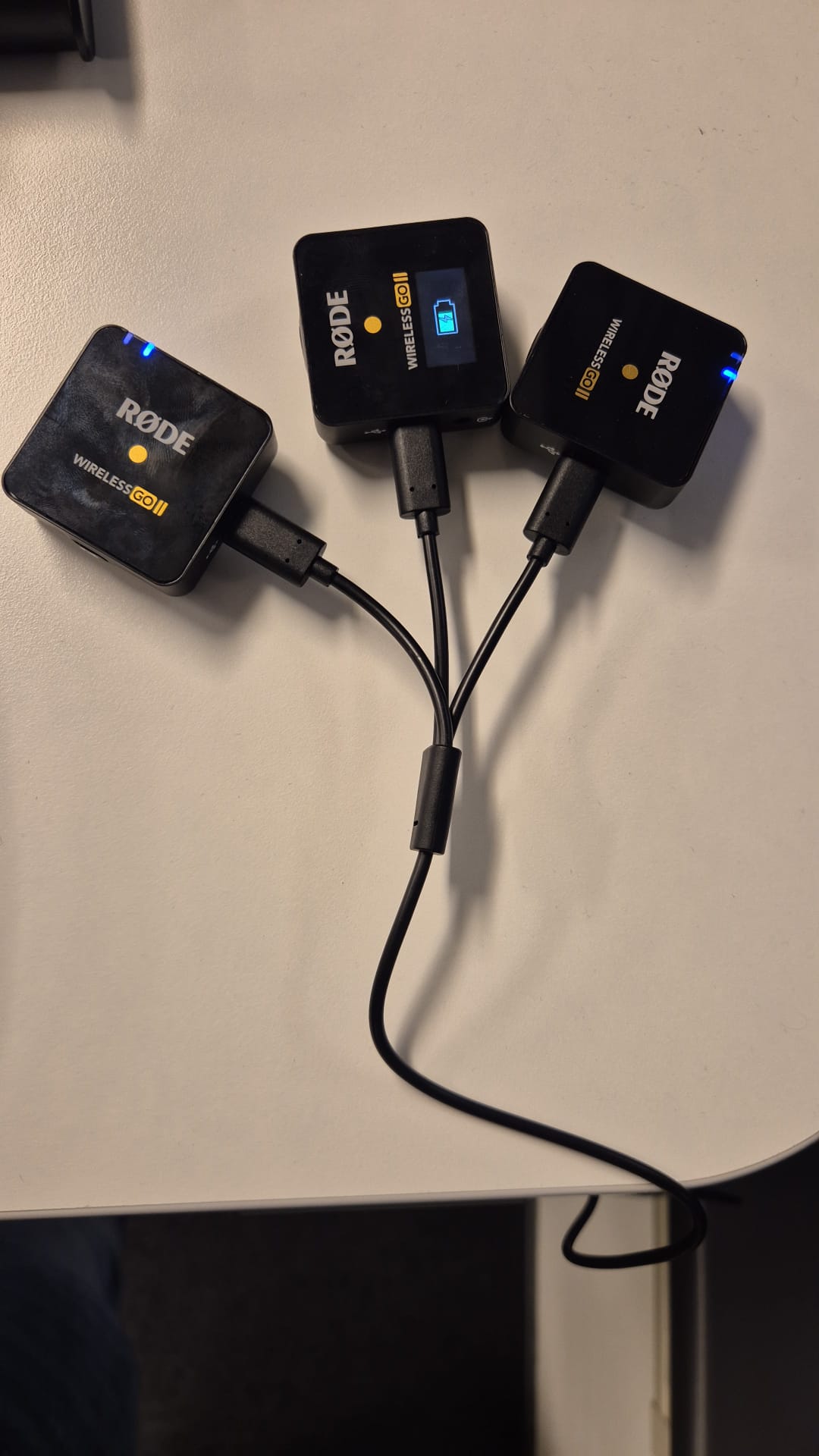
Rode mics used for podcasting
- Microphones: Two sets of Rode Wireless GO II
- Recording Software: Rode Connect
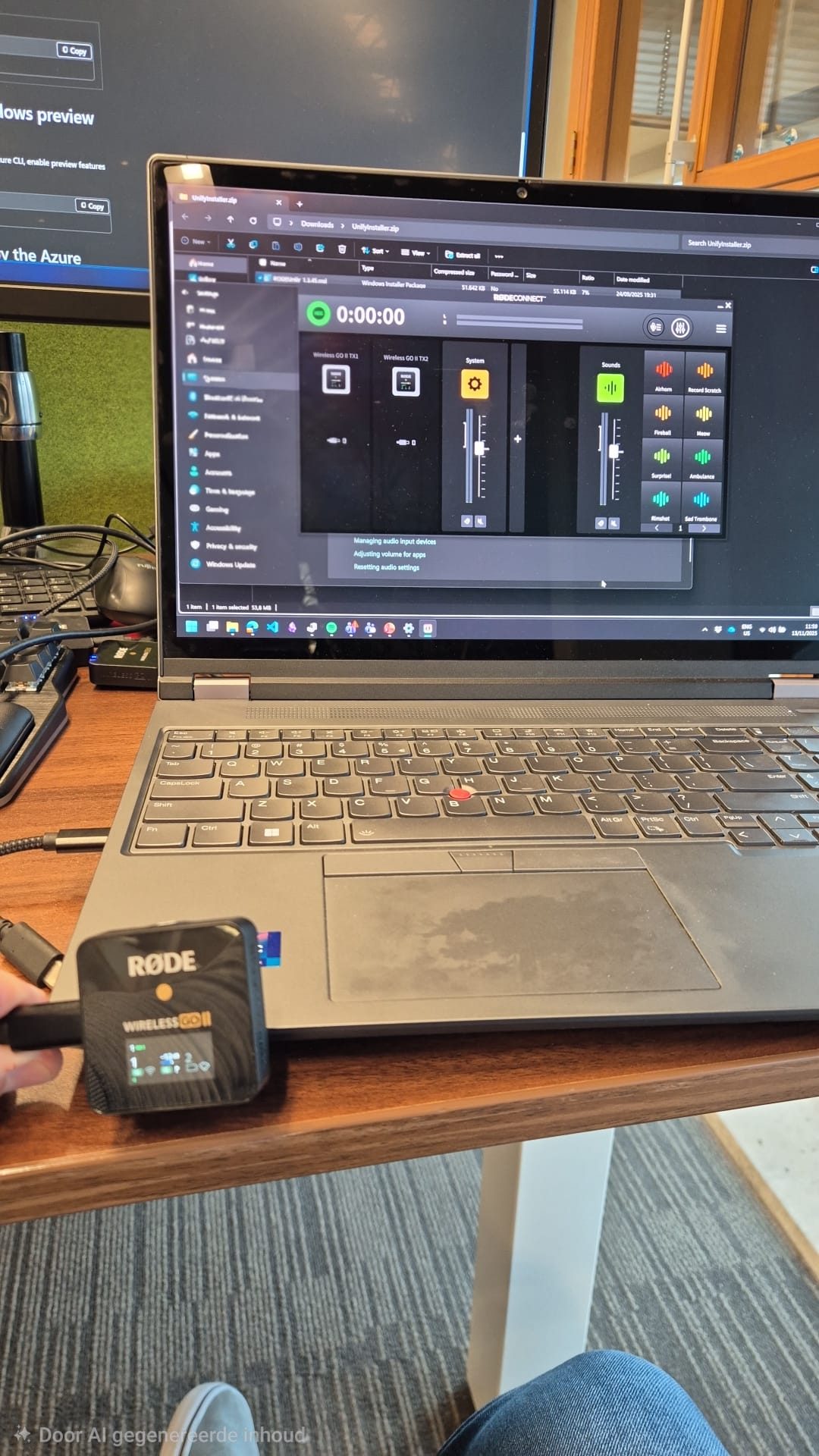
Connecting to Rode Connect
Editing
For editing, we decided to use Audacity, a free and open-source audio editing software. It offers all the basic features we needed to clean up our recordings, add intros/outros, and adjust audio levels. But to edit a full episode using audacity is still quite a bit of work. That is why we we looked into alternatives.
AI-Powered Transcription
To streamline the editing process, we explored AI-powered transcription services. To do this i created a .NET console application that used Whisper.Net to transcribe our recordings. This allowed us to quickly identify sections that needed editing without having to listen to the entire recording.
See the code on GitHub: https://github.com/martdegraaf/TranscribePodcast
The output was good enough but not good enough to use for a workflow within Audacity.
Online AI powered services
We also experimented with online AI-powered services that offer podcast editing features. These platforms can automatically remove filler words, background noise, and even suggest improvements to the audio quality. This significantly reduced the time we spent on manual editing.
The tools we used for this were:
- Auphonic: For automatic audio post-production.
- Trebble.fm: For AI-driven podcast editing and enhancements.
Podcast naming
We prioritized recording over naming our podcast. So we decided to come up with a name after recording the first episode. We decided to name our podast “Oogkleppen” which translates to “Blinders” in English. The name reflects our focus on discussing topics from a unique perspective, challenging conventional wisdom, and exploring new ideas.
Podcast Intro
To create a catchy intro for our podcast, we searched for royalty-free music online. We searched on https://pixabay.com/ and editted music in our spoken intro and field tested it with some friends and colleagues. The feedback was positive, and we felt the intro set the right tone for our podcast.
Blogging
After optimizing our podcasting workflow, I decided to optimize my blogging workflow as well. I mainly blog in markdown in Visual Studio Code. To streamline the process of creating new blog posts, I created a custom task in VS Code.
By using the tasks.json file I automated the process of creating a new blog post file using the hugo cli, so I only have to provide the post name and it will create the file and open it in VS Code.
So my new workflow for creating a new blog post is:
- Use the command palette in VS Code
Ctrl+Shift+Pand select “Run Task” - Select “Hugo: New code post”
- Enter the post name (e.g., “my-new-post”)
- Start writing the blog post in the newly created markdown file.
- Branch and commit your changes as usual.
- Push and create a PR to merge my new blog post.
This will setup a test environment in Azure Static Web Apps and allow me to preview the blog post before merging it to main.
|
|
This post was made using this workflow and i can tell you it works great! After creating the post I also wanted to be up to date with hugo and my theme. So I Updated Hugo to the latest version and my theme to the latest version as well, this took me longer than expected but now everything is up to date.
I have many uncommitted open changes in this repository because i tend to expiriment a lot with new ideas. I fixed some issues with the latest hugo version locally but did not commit these changes, it took me 2 hours to debug and find out what was wrong. The lesson for me is to commit things more quickly and make PR’s small. Updating a theme should be a seperate pull request if you would be normally working in a team. Why would I do this differently for my own blog?
Blocking YouTube
We have kids at home. And they love YouTube. But I tell them the so-called ‘Shorts’ are videos that make them dumb. So to help them focus on better content I have blocked YouTube on our home network using AdGuard within home assistant. This helped us as parents to have more control over what content our kids can access.
Basically we as parents have been framing short videos as ‘dumb videos’ or ‘videos that make you dumb’
Our current workflow was to navigate to AdGuard, go to Filters > Block Services and search youtube in the list and disable it. But, we all know, that blocking youtube completely is not always desired. That is why I want to improve this workflow.
I wanted to have this in our dashboard with a toggle switch. So I searched for solutions and found out that AdGuard has an API that can be used to toggle services. see: https://community.home-assistant.io/t/toggling-adguard-services-from-ha-dashboard/719007
Consuming Blog posts and podcasts
For the setup of our podcast we needed to make it available for multiple platforms. Such as Spotify and Apple podcasts. Most other platforms work with RSS Feeds. So when we make the RSS Feed from Spotify available other third party platforms can also use it.
Consuming podcasts
Earlier I just used Spotify to listen to podcasts. Annoying because when you listen to music via Spotify it is difficult to find and continue the right podcast while in car. Or just always.
I can recommend listening to the podcasts: Darknet Diaries and How to take over the World. If you are Dutch, take our podcast Oogkleppen! 😉
My colleague Peter recommended using Antennapod on Android. Jan uses Pocket Casts on iOS. I installed both apps on Android, i am going to test both, and let you know. A big plus would be if a Android Auto integration is available.
Consuming blog posts
I earlier just checked content reguraly but from now on will organise blogs via Readly. RSS feeds mostly are available via /index.xml on most blogs. Some are available via /feed or /feed.rss. With Readly I can organise blogs into categories and read them when I want to.
After typing this i went on and tested my own blog to see if the feed is working. But i saw many improvements. I also tested it in Inoreader and discovered that my blog images are not showing up in the feed. So I have fixed that as well. Also my relative images in blog text were not showing up correctly so i made sure they are now absolute urls.
Making the right tactical switch
I am using a Dygma Defy keyboard for my daily work. It is a split keyboard that allows me to type more ergonomically. The keyboard has hot swappable switches. And i used the keyboard a year using linear switches. As of 2026 I have switched my right half to tactile switches. Let’s see what half i am most comfortable with.
Checkout this video about the switch choice: https://www.youtube.com/watch?v=noUj7uUyIk4

Dygma Defy - the right half. Brown are tactile, Yellow are linear.
I was using Gateron G Pro 2.0 Yellow (linear) switches. I have just installed Kailh Silent Brown switches on the right half of my keyboard.
Conclusion
There will be more workflows to talk about, I am curious what workflows you have optimized. Please share them with me on LinkedIn or in the comments below.
This article is part of the series '2026 New Year'.
- Part 1: 2026 A New Year, New Goals
- Part 2: 2026 Better Workflows


